Customer records
Keep customer codes, contact details, payment terms and currency together. Sales staff can refer to a consistent customer register when preparing quotations and discussing repeat orders.

Start with the way your business works
A customer asks for a revised quotation. Sales needs the right style code and payment terms. Your team needs consistent records before the next stage of work begins. Explore AWA Media’s ERP software foundation for customer records, quotations and product catalogs, shown through the original ERP interface with fictional Oakmere Industries branding.
Original dashboard and styling. No signup needed. Selected working features with fictional data.
Useful records before bigger workflows
Customer details, style codes and quotation lines often move between spreadsheets and conversations. Consistent records make those details easier to review when staff prepare an offer or look up a product.
Start by exploring the customer and catalog screens in the demo. Then bring your actual business process to a guided demonstration so we can assess the fit, configuration and remaining delivery phases.
The supplied version is a foundation for phased ERP development. Your proposal should identify what is available now and what still needs to be delivered.
Review the current system
These screens are present in the supplied ERP. The public demo opens selected customer and style actions plus a read-only quotation. A full demonstration can review the wider screens and discuss your required configuration.
Keep customer codes, contact details, payment terms and currency together. Sales staff can refer to a consistent customer register when preparing quotations and discussing repeat orders.
Review customer offers with product lines, quantities, prices, discounts and proposed delivery dates. The original quotation screens also show approval status; the public demo offers a read-only fictional example.
Organise product styles with codes, categories and descriptions. Review how colour and size variants relate to the catalog in a full demonstration. The public demo lets you add, edit and archive fictional styles.
Review the material catalog used to describe the inputs your business works with. Bring your leather grades, articles and units to the discussion so the required records can be assessed.
The original system includes screens for patterns and their revisions. A guided review can show how these records fit your product development process and which controls you need for changes.
Review the price-reference screens alongside your quotation workflow. Share how your team maintains buying or selling references, currencies and approval rules before deciding the configuration.
The foundation includes departments, work centres, units of measure, warehouses, stock locations and reason codes. These settings describe your operation; they do not, by themselves, make live inventory or production modules complete.
Review user access, roles, approval policies and audit screens with your team. Permissions and approval workflows need to be agreed around the responsibilities of sales staff, managers and administrators.
See the original interface
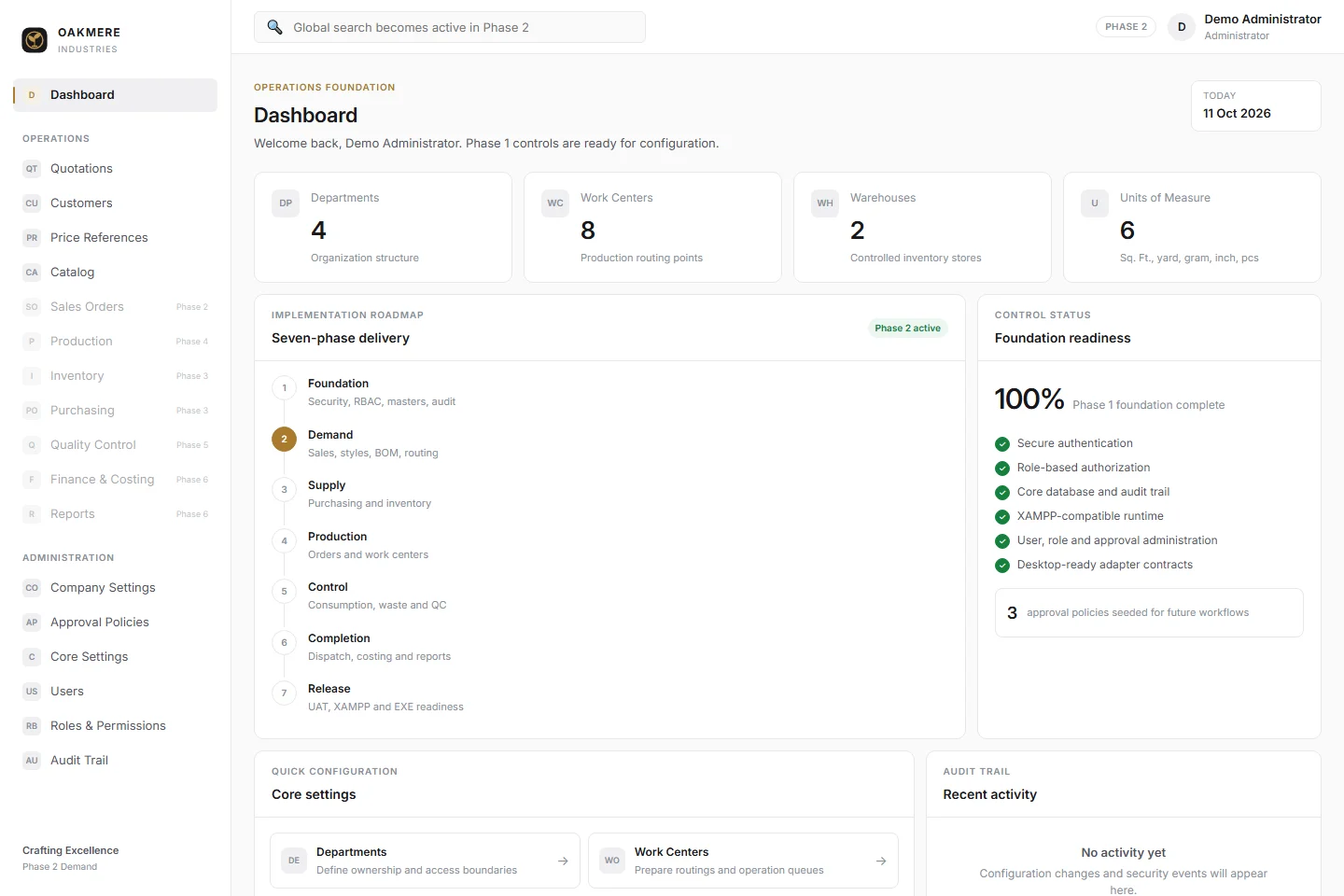
The demo keeps the original ERP dashboard, sidebar, templates, fonts and styling, with fictional Oakmere Industries branding. Its sample records live in a separate visitor session, with no connection to the original business database.
Know what is ready and what is planned
The original dashboard shows Foundation and Demand work, followed by Supply, Production, Control, Completion and Release phases. Its navigation marks sales orders, inventory, purchasing, production, quality control, finance and wider reports as future work.
Those planned modules are not working features of this public demo. Before agreeing an ERP project, review your required order, stock, manufacturing and accounting workflows and ask for a written delivery plan. This should identify the starting scope, later phases and acceptance checks for each stage.
Share the customer, product and quotation records your team uses today. Explain where the same details get entered twice or become difficult to maintain.
Discuss departments, access roles, approval rules, reports and integrations. Identify the modules that fit the existing system and those requiring additional development.
Agree the modules, migration, testing, training and support arrangements in your proposal. Confirm the cost and delivery expectations for each phase.
Quote the scope your team needs
AWA Media’s published custom software builds start at PKR 500,000. Your ERP quote depends on the modules, users, custom workflows, integrations and delivery phases agreed for your business.
We do not publish a fixed subscription price for this ERP. Ask for a written proposal covering setup, hosting, migration, training, support and any recurring or third-party charges. The scope should distinguish current functionality from later development.
Our Gujranwala team can discuss requirements with manufacturers and businesses in Lahore, Karachi, Islamabad and elsewhere in Pakistan. Share your export-market requirements where relevant, including currencies, customer terms and document formats.
Questions before you start
The current system includes foundation and administration screens, customer records, quotations, price references and a product catalog with styles, variants, materials and patterns. The dashboard shows a phased roadmap. Your proposal confirms the modules and work included in your project.
Yes. The demo uses the original dashboard and page templates, CSS, fonts and navigation, with fictional Oakmere Industries branding. It is rendered separately with fictional records. The original ERP application, credentials and database are not used by the public demo.
You can explore the original dashboard, add or edit fictional customers, archive sample customer records, add or edit fictional styles, archive sample styles, and view a sample quotation and its line details. The sidebar and mobile navigation also work.
Quotation creation and approval, variants, materials, patterns, price references, company settings, core settings and user administration are reserved for a guided demonstration. Their links explain the public demo limits. The original sidebar keeps future phases marked as planned.
The supplied dashboard marks inventory and purchasing, production, quality control, finance and wider reporting as future phases. They are part of the roadmap rather than working features of this public demo. Discuss the required scope and delivery plan before purchasing.
No signup is needed. Each visitor receives a separate session with fictional customers, styles and a sample quotation. No original database is connected, no orders are sent and no payments are processed. Enter fictional business and contact details only.
Use the Reset ERP demo link on this page or on a restricted screen, then confirm the reset. This restores the starting customers and styles in your own session. Records also reset after 30 minutes of inactivity.
AWA Media’s published custom software builds start at PKR 500,000. An ERP quote depends on your agreed modules, users, custom workflows and delivery phases. Ask for a written proposal covering setup, hosting, support, migration and any recurring or third-party charges. We do not publish a fixed subscription price for this ERP.
The supplied system uses leather-industry concepts such as styles, variants, materials, patterns and work centres. Share your own products, departments and order process so we can assess the fit and any changes needed. Required manufacturing modules and future phases need an agreed scope.
Tell us what formats your records use and which systems need to connect. Data cleaning, migration and integrations require a compatibility and scope review. They are not active in this demo, and their costs should be confirmed in your proposal.
Try a fictional customer record, product style and sample quotation. When you are ready, arrange a demonstration focused on the records and modules your team needs.